



There really is no difference.Originally Posted by calarus

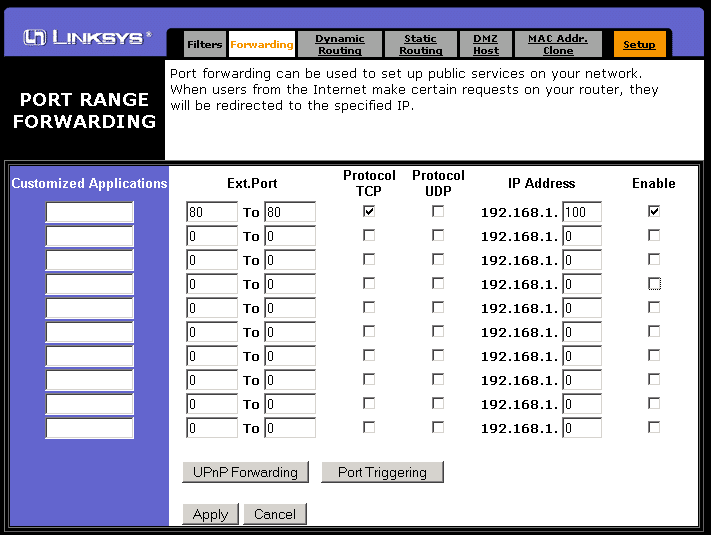
1. You forward the ports in your router (80, 3306, 3724, 8085)
2. You open the ports in your firewall
3. You change your realmd databases' realmlist IP address to your EXTERNAL IP Address or DNS address
4. You change the remote machine's realmlist.wtf file to reflect the hosts machines IP Address or DNS address
5. You create an account for the remote user either by manually doing it or through the website providedCode:set realmlist notreal.no-ip.org set patchlist notreal.no-ip.org set realmlistbn "" set portal us
6. They login
It's the same thing for a LAN except that the EXTERNAL IP is changed to an INTERNAL IP.
I've never seen that one before, have you cleared the Cache folder? I know you said you did a repair so that's out the window... is it interfering with gameplay at all? Could it be caused by an addon?


 Likes: 0
Results 1 to 10 of 1117
Threaded View
-
01-09-10, 01:48 PM #11The Beautiful Abomination





- Join Date
- Jan 2010
- Location
- R'lyeh
- Posts
- 526
- Post Thanks / Like

- Rep Power
- 22
- Reputation
- 397


Last edited by CthulhuFtagn; 01-09-10 at 02:33 PM. Reason: Added picture
System & Security: HP Pavilion dv7-3160us Entertainment Notebook PC - My Video Link
| Windows 7 Home Premium x64 | avast! Free antivirus | ThreatFire | ZoneAlarm Free Firewall | Spybot - Search & Destroy | Malwarebytes Anti-Malware | Panda USB and AutoRun Vaccine | KeePass | TrueCrypt |




 Reply With Quote
Bookmarks