

 Pedregon

 Reply With Quote
Nice guide

 Likes: 0
Results 1 to 6 of 6
-
23-07-08, 11:20 PM #1Contributor


- Join Date
- Jul 2008
- Posts
- 89
- Post Thanks / Like

- Rep Power
- 19
- Reputation
- 81
 Making Your Server Public No Hamachi[Easy]
Making your server public without hamachi,easy way:P
First of all you will need to forward these ports -
8129
8093
3724
3727 (this is for voice chat, it is optional)
80 (this is for apache/your website)
On TCP.
I reccomend going to PortForward.com - Free Help Setting up Your Router or Firewall to be safe.
Ok second download somthing called No-IP here
Install it, using all default options. Keep clicking next.
Once its installed, restart your computer.
open up No-IP, if it didn't automatically
Open up a web browser, and browse over to the
No-IP website
Create a account and login. Along the left side of the site is a Hosts /
Redirect option. Click on that, and click "Add".
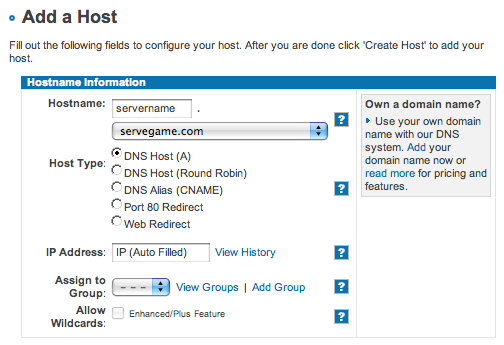
In the next window,the right side of the screen, Fill in the blanks. Doesn't
matter what you put here, but write it down for later use.
Realmlist.wtf
Browse over to your World of Warcraft directory, and locate a file called Realmlist.wtf Open that up in Notepad.
Change it to read "Set Realmlist ". Save that file
Ok now open up your repack folder,locate the file called Realms.conf. Open that with Notepad.
Change it to read that address No-IP address you created.
Restart your server, and you are doneCode:Realm1 Name = "Test Realm" Address = "No-IP address:8129"

› See More: Making Your Server Public No Hamachi[Easy]
-
23-07-08, 11:21 PM #2Scout


- Join Date
- Jul 2008
- Posts
- 19
- Post Thanks / Like
- Rep Power
- 18
- Reputation
- 12
-
23-07-08, 11:31 PM #3Contributor
- Join Date
- Jul 2008
- Posts
- 89
- Post Thanks / Like
- Rep Power
- 19
- Reputation
- 81
Thanks Originally Posted by Jgro1413


<Filler>
-
23-07-08, 11:46 PM #4Sergeant
- Join Date
- Jul 2008
- Location
- In Earth
- Posts
- 84
- Post Thanks / Like
- Rep Power
- 18
- Reputation
- 11
Good Job
-
24-07-08, 06:24 PM #5Beginner

- Join Date
- Jul 2008
- Location
- Kentucky, USA
- Posts
- 8
- Post Thanks / Like
- Rep Power
- 18
- Reputation
- 1


You don't need to forward port 8093 unless you are connecting two servers on different computers.
Oh, and make sure that you leave it on DNS Host (A).
Last edited by Bandit; 24-07-08 at 06:28 PM.
-
25-07-08, 01:54 AM #6Founder


- Join Date
- Jul 2008
- Location
- HeaveN
- Posts
- 15,917
- Post Thanks / Like
- Rep Power
- 10
- Reputation
- 295
Register to remove this adNice one Pedergon , keep it up

Related Threads - Scroll Down after related threads if you are only interested to view replies for above post/thread
 Apple
Apple

Posting Permissions
vBulletin Licensed to: MMOPro.org
Bookmarks